

Choose a platform
-
 Windows Version 3.8.1231.120811
9 MB
DownloadRecommended for your device
Overview
Introduction
Razer Synapse is a software platform developed by Razer Inc. a renowned gaming hardware manufacturer. Designed to complement Razer gaming peripherals, Synapse serves as a single configuration software that allows users to customise and optimise their Razer devices. Let's take a look at the main features and answer common questions about Razer Synapse.
Razer Inc., a global gaming hardware company founded in 2005. Known for its advanced gaming peripherals, Razer is committed to providing gamers with innovative tools and technology to enhance their gaming experience.
Key features
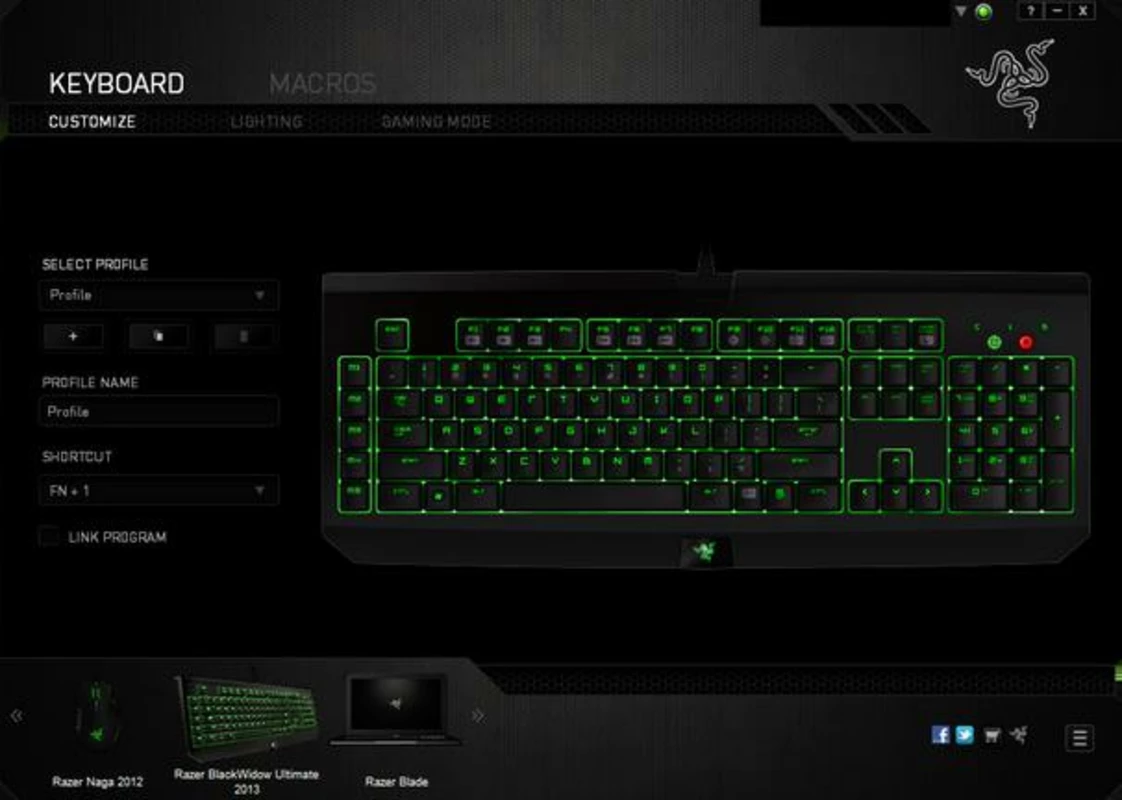
- Device personalisation: Razer Synapse allows users to customise the settings of their Razer peripherals, including gaming mice, keyboards and headsets. This customisation can include sensitivity adjustments, macro settings and RGB backlighting.
- Cloud Storage: Synapse offers cloud storage for saving user settings. This makes settings available from any device with Razer Synapse installed, ensuring a consistent experience across platforms.
- Macro Customisation: Gamers can create and assign complex macros to the buttons on their Razer devices, improving efficiency and responsiveness in-game.
- RGB backlight control: For RGB backlit devices, Synapse allows you to personalise lighting effects to create dynamic and visually appealing gaming settings.
- Firmware Update: Razer Synapse provides users with a convenient platform to update the firmware of their Razer devices, ensuring the latest features and optimisations are available.
Razer Synapse features an intuitive and user-friendly interface, making it accessible to both casual and hardcore gamers. The design of the software focuses on simplicity and usability, allowing users to easily navigate and configure their devices.
Conclusion
Razer Synapse, developed by Razer Inc. is a key tool for gamers looking to optimise and personalise their Razer peripherals. With features such as device customisation, cloud storage, macro customisation and RGB backlight control, Synapse offers a comprehensive platform to enhance the gaming experience. Whether you're a competitive gamer or just a hobbyist, Razer Synapse provides the tools to unlock the full potential of your Razer gaming peripherals.
Features
Pros
- Device Customization
- Cloud Sync
- Macro Support
- Firmware Updates
- Chroma RGB Lighting Control
Cons
- Requires Online Account
- Resource Usage
Screenshots
Ask a Question
Is Razer Synapse free to use?
Yes, Razer Synapse is free to download and use. It is equipped with additional features that enhance the customisation of Razer peripherals.
Can I use on non-Razer devices?
Razer Synapse is designed specifically for Razer peripherals and may not be compatible with devices from other manufacturers.
What is macro configuration in Razer Synapse?
Macro customisation allows users to create and assign complex macros to buttons on their Razer devices, improving efficiency and responsiveness in game play.
Is Razer Synapse necessary for Razer devices to work?
While the basic functionality of Razer devices is possible without Synapse, this software opens up advanced customisation options, so its use is highly recommended for an optimal gaming experience.
Similar programs
-
 Discord Discord Inc
2.4 (59) Free 305 687
Windows, Mac OS, iOS, Android, Linux
View Discord -
 DroidCam Client Dev47Apps
5 (1) Free 29 483
Windows, iOS, Android, Linux
View DroidCam Client -
 Cyberlink PowerDVD CyberLink Corp.
5 (1) Free 13 304
Windows
View Cyberlink PowerDVD -
 Sandboxie Ronen Tzur
2.5 (2) Free 42 087
Windows
View Sandboxie


